Clipboards on every door
Paper logs live where the work happens. Nobody sees a missed check until someone walks the rooms.
For hospital and pharmacy teams
Fractal Pharma replaces the clipboards and binders behind your daily records. Checks are recorded in seconds, with who did it and when, and they are ready to show when someone asks.
Personal accounts are free. Facilities have simple per-site pricing. See facility pricing.


Real screens from the app. All names and numbers are made up.
The problem today
Most pharmacies still keep their daily records on paper, one sheet per fridge, room and cart. It works, until someone has to prove it.
Paper logs live where the work happens. Nobody sees a missed check until someone walks the rooms.
A blank line on a paper log usually turns up at the end of the month, or when an inspector points at it.
Pulling binders, matching initials and making copies takes people away from the pharmacy.
How it saves time
Three everyday jobs, before and after. These are examples of how the product works, not measured results. Your routine will differ.
Before, on paper
Walk to each clipboard, write the reading, add your initials. Later, someone checks every sheet for blanks.
With Fractal Pharma
Open today’s list on a phone or the shared tablet, type the reading and tap the check mark. Your name and the time are added for you, and a reading outside the range is flagged.
Before, on paper
Flip through the logs in each room to learn what is not done yet.
With Fractal Pharma
The home screen counts what is due, what is done and what needs attention today. Open a row to go straight to the right log.
Before, on paper
Pull the binders, find the right month and copy the pages.
With Fractal Pharma
Choose the area and the period, then generate a PDF or CSV report.
What it does
Each area fits the way your facility works: your rooms, your routines, your team.
Temperature and humidity
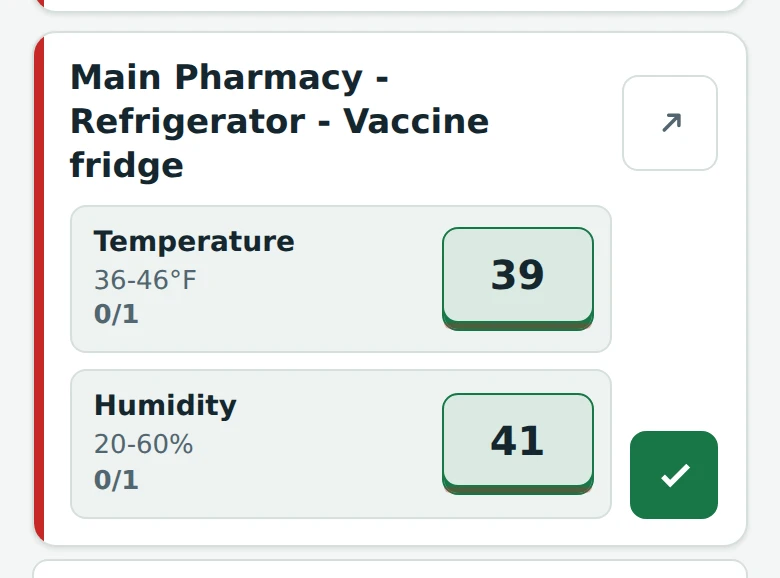
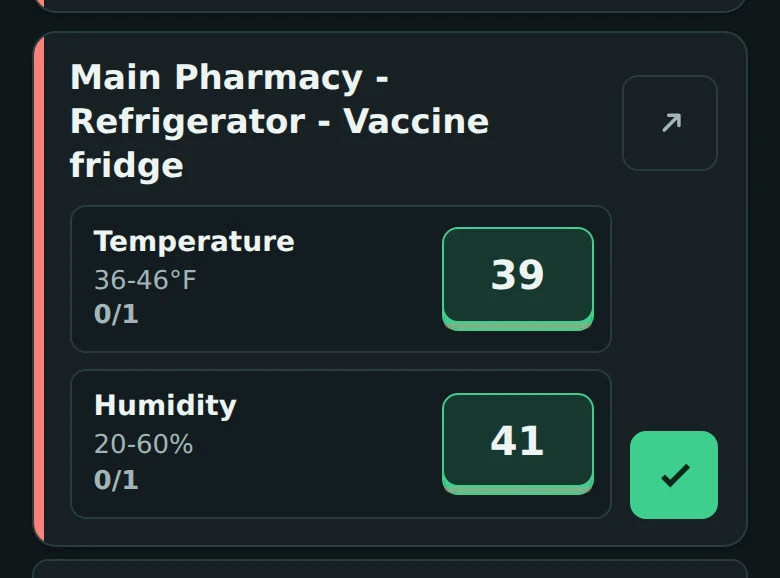
Each monitoring point shows its allowed range next to the box. Type the numbers and confirm. No sheet to find, no initials to write.
Cleaning logs
Set up the steps once. Staff tick them off, add a note where needed and record the cleaning. If an area is closed or the cleaning was not done, that is recorded too.


Outdates, carts and kits
Each cart or kit shows its lock numbers, the next item to expire and who made the last change. Expiry checks have a due date and a person assigned.


Purchasing
Build the order list together. When the order is placed, record what was actually ordered and from whom. When it arrives, record what was received.


Built for inspection day
Readings, cleanings, checks and orders are recorded with who did it and when.
On readings, cleaning logs, department tasks, unit inspections and orders, a mistake is fixed with a correction and a reason. The original entry stays in the history.
Pick the area and the period and generate a PDF or CSV.
Roles and permissions per site. On a shared tablet, each person signs in once with their password, then unlocks with their own 6-digit PIN.
Fractal Pharma is a record-keeping tool. It is not a certification, and it does not replace your own policies.


How it works
Your own sign-in. A personal account is free.
Join your team with an access code from your facility admin, or start a new facility by choosing a plan.
Set up your rooms, checks and cleaning steps. Today’s work appears on one screen.
Pricing
Facility workspace
Shared operations, roles, permissions and records stay separate for each facility. Staff join with an access code and your approval.
Paid by card. The current price is on the pricing page.
See facility pricingFree personal workspace
Keep your professional details, licenses, private work history and notes in one place. Use one account across multiple facilities, with separate access at each site.
Questions
No patient data. Fractal Pharma keeps operations records, not prescriptions or patient charts. Please never enter patient information.
No. Fractal Pharma is not designed for patient information. It keeps operations records such as temperature checks, cleaning logs, outdates and orders. Do not enter patient names, record numbers, prescriptions or any other patient identifiers.
No software can do that for you. Fractal Pharma helps your team keep clear, complete records and show them when asked. Your policies and your regulators decide what you must record.
Yes. It runs in the browser on phones, tablets and computers. On a shared tablet, each person signs in once with their password, then switches to their own name with a 6-digit PIN.
Each person creates their own account and enters the facility access code. A facility admin approves the request and sets what that person can do.
Yes. Reports can be generated as PDF or CSV, and logs can be downloaded.
Personal accounts are free. A facility is a paid subscription per site, paid by card. The current price is on the pricing page.See facility pricing.
Yes. Each site is its own facility with its own subscription, so every additional site is billed separately. People who work at more than one site can use the same login: one account can belong to several facilities, and roles, permissions and records are separate for each facility.
Ready when your next inspection is
Create your account in a minute. Join your facility with an access code, or start a new one. Questions first? Email support@fractalpharma.com.